Screenshard
Professional screenshot studio with local AI image enhancement
Screenshard is a native desktop app that makes capturing, editing, and sharing your screen instant. It features a built-in OCR text extractor, an on-screen Eyedropper with 8× magnifier, theme-aware custom notifications, and an AI Image Enhancer to scale images up to 4× locally using ESRGAN-Thick.
- Category
- Utilities
- Status
- Available
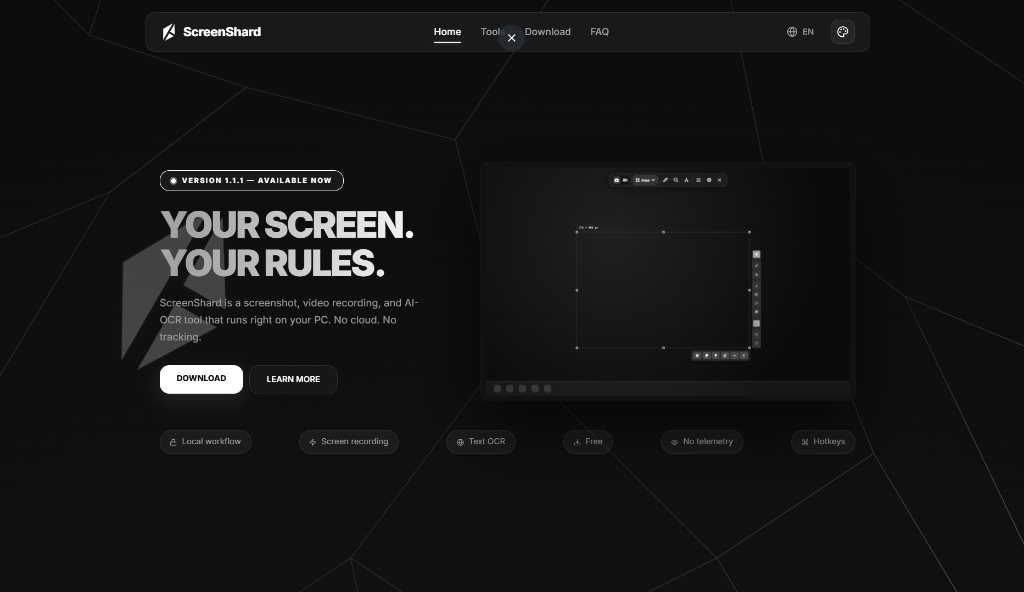
"Privacy-first, utility-focused. Screenshard gives you full control over your screen capture workflow."
Your Screen. Your Rules.
A lightweight utility designed to help you capture, annotate, and extract information locally. No cloud sync, no accounts required, no hidden telemetry.
100% Offline Core
Your screenshots and extracted text never touch the cloud. OCR and image enhancement run locally on your hardware, ensuring absolute privacy.
Zero-Second Startup
Runs quietly in your system tray and activates instantly via customizable system hotkeys. No loading screens, no delays.
Lightweight & Fast
Written with performance in mind. Low memory usage, no heavy background services, and instant clipboard copying.
Built for Daily Productivity
Screenshard fits seamlessly into the daily workflows of professionals, creators, and engineers.
Developers & QA Engineers
Capture bug details, draw quick arrows to point out glitches, blur authentication tokens, and copy error logs directly from non-selectable screen containers.
Writers & Researchers
Extract text from online videos, document scans, protected webpages, or PDFs instantly, saving hours of manual re-typing.
Students & Academics
Capture lecture slides during online classes, copy code snippets or math formulas from video tutorials, and organize study guides easily.
Everything you need, in one place
Say goodbye to using separate apps for screenshots, video recording, image editors, and color pickers.
Forge Annotation Editor
Add arrows, text boxes, blur sensitive details, and place sequential numbering steps on top of your screenshots with a multi-layered canvas.
Local OCR Text Grabber
Select any portion of your screen and copy the text inside it to your clipboard. Backed by offline Tesseract with Ukr/Eng packs.
Smart Workspace Memory
Remembers your last selected screen coordinates and active annotation tools, allowing you to repeat identical screenshots and edit flows with one click.
Achievements & Galleries
Track milestones with fun achievements (Beginner, Director, Master) and browse your local capture history in a organized search-enabled gallery.